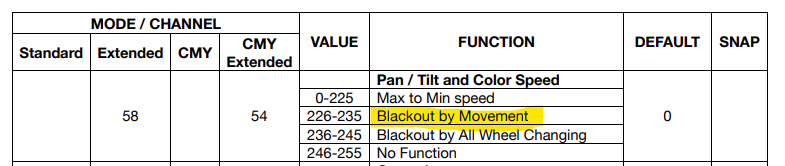
Fixture Blacks Out During Pan/Tilt Movement
If a moving head fixture blacks out specifically while it is panning or tilting, and returns to normal output once it stops moving, the most likely cause is a movement-masking function. Many moving head fixtures include a setting, sometimes called "blackout by movement" or similar, that closes the shutter or drops output automatically whenever the pan or tilt motors are running. Its purpose is to hide the visible sweep of the fixture as it moves between positions, so that only the final, static position is seen.
Why this happens
This is a deliberate feature, not a fault. It is typically controlled either:
through the fixture's on-board menu, as a standalone setting, or
through a DMX channel value, often part of a "special functions" or "control" channel in the fixture's personality.
If this setting is active, the fixture will blackout every time it receives a pan or tilt instruction, which can look like a fault if you are not expecting it.
Steps to check
Check the fixture's on-board menu for a setting related to blackout on movement, sometimes listed under display, control, or special function menus. [confirm: exact menu path and setting name for this fixture range]
If the fixture is controlled by DMX, check the DMX chart or personality sheet for a channel that governs this function, and confirm what value range disables it. [confirm: DMX channel and value range that controls this function for this fixture range]
Disable the function, either from the fixture's menu or by sending the correct DMX value from the console.
Move the fixture again to confirm the blackout no longer occurs during pan or tilt movement.
If the setting is already disabled
If you have confirmed the function is off and the fixture still blacks out during movement, this points to a different cause, such as a dimmer or shutter fault, and should be treated as a separate issue rather than a control setting.